
wizard
The latest version of the wizard can easily be started via a simple command
curl -Ls https://github.com/jarklin/jarklin/raw/main/scripts/wizard.sh | bashINFO
After the installation you can use the delivered version. This should bring no problems as the wizard is rarely updated. But the recommended way is to use the latest version via the command above.
/path/to/destination/jarklin/wizardAfter the launch, you get a terminal-based interactive UI for a convenient usage
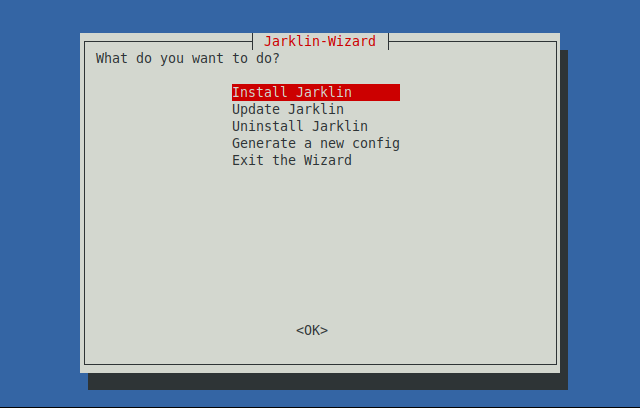
Installation
This installs the newest version of Jarklin. (Can also be used to update the existing version)
Update
INFO
Currently not available yet. Use the installation to install a newer version.
Uninstall
As the name suggests this can be used to cleanly remove the installed version of Jarklin.
Config Generation
In order to serve a directory you need to create a configuration file the directory you want to server. Without an existing configuration file Jarklin refuses to start. This was made to ensure you serve the correct directory.
The filename is either .jarklin.yaml or .jarklin/config.yaml.
INFO
.yaml is the recommended file-format but .json or .jsonc is also supported in case you are more familiar with that format or prefer it for different reasons.
The Wizard offers a convenient dialog to generate such a config file.
See Configuration for more advanced options.